File Type Detector
LocalDrop any file to detect its real type from magic bytes — wrong extensions and spoofing flagged — and get the tools that open or convert it. Free, no upload.
Drag files here, or click to browse
Supports */*
Choose fileDetect a file's real type from its magic bytes and get recommended tools — all locally.
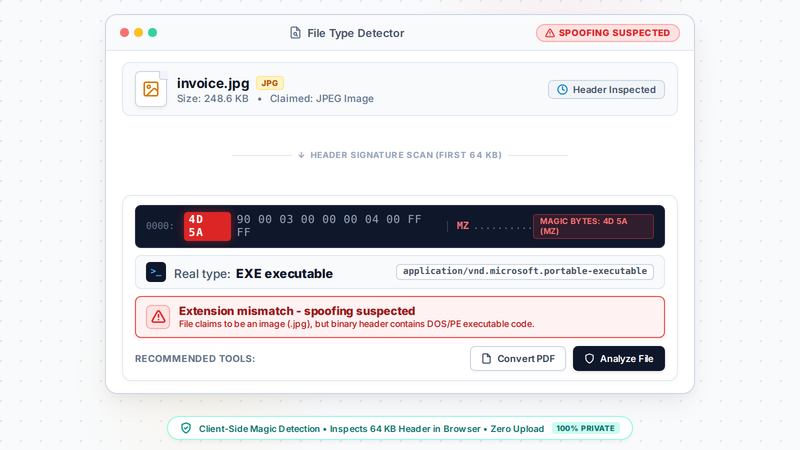
What is it? File Type Detector inspects a file's magic bytes to determine its real type (regardless of extension) and recommends the Vecaria tools that can open or convert it. ZIP containers are subdivided by their contents — docx/xlsx/pptx/3mf by characteristic entries, odt/ods/odp/epub by mimetype entry content, jar/apk by META-INF entries — and extension/content mismatches raise a red spoofing warning. Only the first 64KB header is read, locally in the browser.
TL;DR: Detect a file's real type from magic bytes — wrong extensions and spoofing flagged — then open a recommended tool that handles it.
How to use
- Drop any file (one at a time — if you drop several, only the first is identified and a notice says so).
- Read the detected type.
- Open a recommended tool to process it — every detected type links to the Vecaria tools that can open or convert that format.
FAQ
How does it detect type?
It reads the file signature (magic bytes) rather than trusting the file extension.
Does it recognize Office files (docx/xlsx/pptx)?
Yes. They are ZIP containers, and the detector inspects characteristic entries inside (word/document.xml, xl/workbook.xml, ppt/presentation.xml) to tell Word, Excel and PowerPoint documents apart and recommend the matching converters. ODF documents (odt/ods/odp) and EPUB are split by their mimetype entry content, JAR/APK by META-INF entries such as AndroidManifest.xml; other ZIP containers without characteristic entries are still reported as ZIP.
Is my file uploaded?
No — only the header bytes are read locally.
What are magic bytes?
Magic bytes are a fixed signature at the start of a file — for example %PDF for PDF or PK\x03\x04 for ZIP-based formats. The detector reads these bytes (plus plain-text signatures further in) instead of trusting the filename extension, so a renamed file is still identified correctly.
Can it identify a file with no extension or a wrong one?
Yes — identification is content-based, so a missing or faked extension does not matter. When the content's magic bytes disagree with the extension the file claims, you get a red spoofing warning advising you not to open it with that app; filenames containing an RTLO (U+202E) reversing character are flagged too.
Which formats can it detect?
Common image, PDF, document, CAD, 3D, point cloud, GIS, PCB and G-code formats, plus ZIP containers subdivided by their contents — docx/xlsx/pptx/3mf by characteristic entries, odt/ods/odp/epub by the mimetype entry, jar/apk by META-INF entries. Containers without characteristic entries are still reported as ZIP.
Supported formats
Limitations
- Detection is signature-based; unsigned plain text (e.g. .txt/.log) can be misjudged — cross-check the result against the file's source.
- docx/xlsx/pptx/3mf, odt/ods/odp/epub/jar/apk are ZIP containers subdivided by characteristic entries (e.g. word/document.xml, AndroidManifest.xml) or mimetype entry content (always stored uncompressed); other ZIP containers without characteristic entries are still reported as ZIP.
- The extension-spoofing red warning compares content magic bytes against the extension's claimed type; plain-text files without a magic number are outside its coverage.
- Runs locally in your browser — only the first 64KB header is read, never uploaded.
Privacy
Privacy first: this tool runs entirely in your browser — your input and files never leave your device, and everything is cleared when you close the page.