BOM / CPL Merge and Check
LocalMerge BOM and CPL (pick-and-place) CSVs by designator — free, no upload, in your browser. Flag missing parts before PCBA and download the aligned CSV.
BOM (CSV)
CPL / Pick-and-Place (CSV)
Gerber copper layer (optional — for board overlay)
Paste BOM and CPL CSVs; merges by designator and flags missing placements. Runs locally.
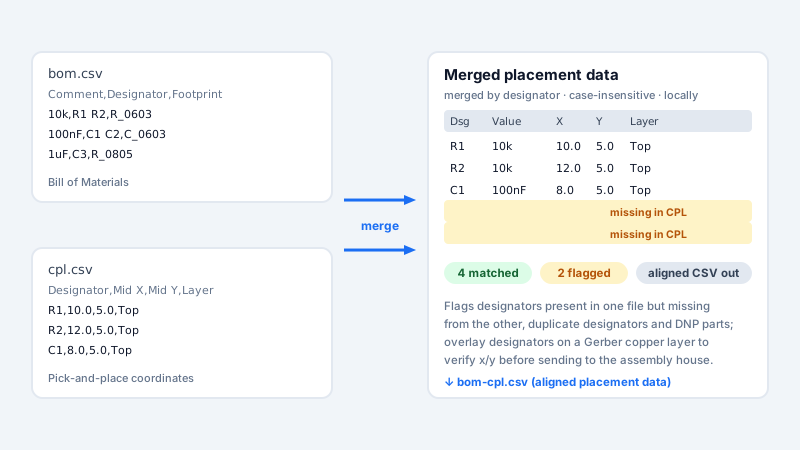
What is it? BOM / CPL Merge combines a bill of materials CSV with a pick-and-place (CPL) CSV, matching rows by designator and flagging components that are missing from either file.
TL;DR: BOM / CPL Merge aligns a bill-of-materials CSV with a pick-and-place CSV by designator and flags missing parts on either side. Paste both CSVs, click Merge, review the report and download the aligned CSV — optionally drop in a Gerber copper layer to see designators on the board. Free with no sign-in; runs locally in your browser, nothing is uploaded.
How to use
- Paste your BOM CSV into the BOM box and your CPL (pick-and-place) CSV into the CPL box.
- Click Merge — column headers are auto-detected (Designator, Value, Footprint, Mid X/Y, Rotation, Layer and common synonyms).
- Review matched and missing designators in the report, then copy or download the aligned CSV.
- Optionally drop in a Gerber copper layer (RS-274X) — the board overlay marks each designator at its CPL x/y (top/bottom color-coded) so you can eyeball placements before ordering.
FAQ
Why do I need this?
Assembly houses need BOM and placement data aligned; this catches missing or mismatched parts before production.
Is it local?
Yes, merging runs in your browser with no server round-trip.
Are missing designators always an error?
No — they may be intentionally not placed (DNP). Confirm against your design before acting.
Is it free?
Yes — merge, report and CSV download are free with no sign-up; nothing leaves your browser.
What file formats can I merge?
Paste any CSV or tab-separated text. Headers are auto-detected (Designator/Ref, Value/Comment, Footprint/Package, Mid X/Y, Rotation, Layer/Side and common synonyms); separated designators in one cell are also fine.
Does it work with JLCPCB / LCSC BOM and CPL files?
Yes — the JLCPCB BOM/CPL template columns are covered by the auto-detected headers. Note this tool aligns your two files by designator; it does not check LCSC stock or prices.
What does the aligned output CSV contain?
One unified table: Designator, Value, Footprint, Mid X, Mid Y, Rotation and Layer for every matched part, plus listed gaps (missing in BOM / missing in CPL) you can act on before assembly.
Can I see the designators on the board?
Yes — drop a single RS-274X Gerber copper layer and the overlay view marks each designator at its CPL x/y (top and bottom color-coded). Designators with missing or out-of-range coordinates are listed instead of drawn, so nothing is silently misplaced.
Examples
- Paste BOM and CPL → Merge → review matched/missing designators and download the aligned CSV
- BOM lists R1–R3 but CPL has only R1, R2 → the report flags "Missing in CPL: R3"
- CPL contains B7 (not in BOM) → the report flags "In CPL but not in BOM: B7"
Supported formats
Limitations
- Headers are auto-detected (Designator/Ref, Value/Comment, Footprint/Package, Mid X/Y, Rotation, Layer/Side); an unrecognized designator header raises an actionable warning on the page (that column stays empty until fixed).
- Designators can be separated by spaces, commas or semicolons within one cell.
- Runs locally in your browser; nothing is uploaded.
- Designator matching is case-insensitive (R1 and r1 are treated as the same).
- Duplicate designators are flagged in the report (both BOM and CPL); the merge keeps the last occurrence.
- A designator missing from the CPL may be intentionally not placed (DNP) — confirm before acting on the report.
Privacy
Privacy first: this tool runs entirely in your browser — your input and files never leave your device, and everything is cleared when you close the page.
Related tools
Standards & comparison
| Dimension | Vecaria (this tool) | Online converters (cloud) | Desktop professional CAD |
|---|---|---|---|
| Privacy | Runs locally in your browser; the file is not uploaded | You upload the file to a third-party server | Runs locally |
| Wait | No queue — as fast as your own device | Upload plus cloud queue | Local application startup |
| Standards support | RS-274X (Gerber copper overlay) | Varies by service, often older subsets | Full vendor protocol sets |
| Install footprint | 0 MB — runs in the browser | 0 MB | Several GB of storage |