Gerber DFM Check
LocalGerber DFM checks in your browser, no upload: 55 graded checks, configurable thresholds, mm violation coordinates and MD/JSON/PDF reports. Pro feature.
Select Gerber layers (.gbr/.gtl/.gbl/…, incl. .gto/.gbo silkscreen, .gts/.gbs solder mask, .gtp/.gbp paste and .gko/.gml outline) and Excellon drill files (.drl/.xln). 55 checks: min track/pad/drill, copper spacing (track/pad/aggregate), sliver, annular ring + via/PTH tiers + broken-ring, hole-to-pad/track/hole + overlap/duplicates, drill-to-copper, drill/slot to board edge + slot aspect, track/pad to board edge, silk over pad/hole, silk width/spacing/edge, solder-mask sliver/missing opening/copper/edge, paste coverage, stubs/copper balance (heuristics), copper-net connectivity (isolated islands / largest-net share / possible open-circuit necks — a netlist-level substitute without a reference netlist), file hygiene (macro/unused apertures, undeclared format & units), layer completeness, board size — each with configurable threshold, severity and mm coordinates. Runs locally.
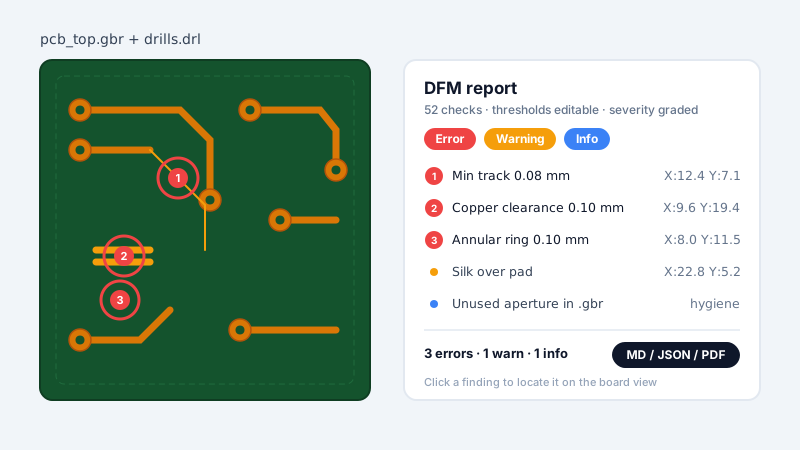
What is it? Gerber DFM Check parses Gerber (RS-274X) and Excellon drill files locally and runs 55 graded checks: widths (min track / pad), spacing (track/pad/track-pad + aggregate copper spacing, sliver), holes (annular ring with via/PTH tiers and broken-ring detection, hole-to-pad / hole-to-track / hole-to-hole + overlap/duplicate drills, aggregate drill-to-copper), silk (silk-over-pad, silk-over-hole, silk width/spacing/edge), solder mask (sliver, missing opening, mask-to-copper, mask-to-edge), paste (opening coverage), planes (isolated islands / acid traps / residual copper — disclosed heuristics), copper-net connectivity (each copper layer rasterized into connected components at ~0.1 mm grid: isolated islands / largest-net share / possible open-circuit necks — a netlist-level substitute computed without a reference netlist), edges (copper/track/pad to board outline, drill/slot to edge + slot aspect), drills (min drill, G85 slot count), file hygiene (macro/unused apertures, undeclared format & units), layer completeness and board size. Each check has a configurable threshold, a severity level (error/warn/info) and mm coordinates for violations. Reports download as Markdown, JSON (structured, with locations) and PDF.
TL;DR: Run 55 graded DFM checks (incl. copper-net connectivity) on Gerber/Excellon files in your browser — nothing is uploaded. Configurable thresholds, severity levels, mm violation coordinates, and an MD/JSON/PDF report you can attach to any order; the check set is a Pro feature.
How to use
- Select the Gerber layer files (.gbr/.gtl/.gbl/…, incl. .gto/.gbo silkscreen and .gko/.gml outline) and Excellon drill files (.drl/.xln) — silk and outline layers are auto-detected by filename or X2 attributes.
- Adjust thresholds if needed: 5 basic ones (min track/drill/pad, copper spacing, drill-to-copper) plus 30 advanced ones (annular/via/PTH tiers, hole-to-hole, drill/track/pad/silk to edge, silk width/spacing/over-hole, mask bridge, mask-to-copper/edge, paste check pad, slot aspect, sliver gap, acid-trap angle, island / residual sizes, copper balance, board min/max edge), each labeled with its unit — empty or invalid fields fall back to the defaults (a hint tells you when that happens).
- Click "Run DFM" — the report shows summary cards, a 55-row rule table with severity (error/warn/info) and pass/fail status, and issues grouped by severity, each listing violation coordinates in mm (Gerber space).
- Download the report as Markdown, JSON (structured, with violation locations and copper-net measurements, for CI / fab systems) or PDF (typeset summary table; the Chinese report embeds a CJK font subset) and send it to your fab.
FAQ
What checks are included?
55 checks across widths, spacing, holes (annular ring with via/PTH tiers, broken rings, hole-to-pad/track/hole, duplicate drills), silk, solder mask, paste, planes (islands / acid traps / residual copper, heuristics), copper-net connectivity (isolated islands / largest-net share / possible open-circuit necks), edges, drills, file hygiene, layer completeness and board size — plus input-validity checks.
Does the copper-net connectivity replace a netlist?
No — it is a netlist-level substitute computed from the Gerber artwork alone: each copper layer is rasterized (~0.1 mm grid) into connected components to report isolated islands, the largest net's copper share, and single-cell-wide necks that risk etch breaks. Without a reference netlist it cannot verify wiring correctness (the gap vs HQDFM-style netlist-level open/short analysis); for electrical sign-off use your fab's netlist tooling.
Are violations located?
Yes — failing checks list violation coordinates in mm (Gerber space) on the page and in the MD/JSON/PDF exports. Click a coordinate to locate and highlight it on an embedded board view rendered with the gerber-viewer pipeline (all local); layers the viewer cannot render keep text-only coordinates.
Is it local?
Yes, parsing and checking run in your browser; the check itself is a Pro feature.
Is it free?
No — Gerber DFM Check is a Pro feature; on the Free plan this page shows an upgrade prompt.
How is this different from my fab's DFM check (JLCDFM, HQDFM)?
Fab-side analyzers need you to upload the Gerber set and check it against that one fab's fixed capability list — HQDFM is a Windows download bound to NextPCB quoting. This tool runs the same kind of preflight in your browser with nothing uploaded: 55 checks whose thresholds you can set to any fab's capability list, with a neutral MD/JSON/PDF report you can attach to any order. The honest gap: fab tools like HQDFM also run netlist-level open/short analysis against a reference netlist — we don't (see copper-net connectivity), so use the fab's tooling for electrical sign-off.
Which Gerber and drill formats are supported?
RS-274X Gerber (.gbr/.gtl/.gbl/.gts/.gbs/.gto/.gbo/.gko/.gml …) and Excellon drills (.drl/.xln). X2 FileFunction attributes are read, and silk/outline layers are auto-detected by filename otherwise. Older RS-274D (aperture-less) Gerber is not supported — those files fail loudly rather than pass silently.
Can I check multiple boards or two revisions?
One board per report; drop a second (B-revision) board into the report page to diff the two violation lists under the same thresholds. For structural layer differences between two files (apertures, flashes, outlines) use Gerber Layer Stackup's Compare mode.
Examples
- Select the Gerber layers (incl. silk/board outline) and the .drl → get 55 graded check results with violation coordinates → download MD/JSON/PDF reports
Supported formats
Limitations
- Fabricator-specific rules are not built in; compare the report to your fab's capabilities.
- Copper/drill spacing checks use a flash-circle + trace-capsule approximation, not exact geometric clearance.
- Annular ring is measured per hole-pad pair (minimum over pairs); when no pairing is found it falls back to a global (min pad − min drill)/2 estimate — the issue message states which was used.
- Island / acid-trap / residual-copper checks are per-layer connectivity heuristics and can misreport; results are advisory.
- Copper-net connectivity is a rasterized heuristic (~0.1 mm grid, auto-coarsened for very large boards): islands/necks follow connected-component and cut-point semantics, sub-grid features are approximated, and the neck analysis is honestly skipped (flagged) when a layer exceeds 600k grid cells. Without a reference netlist it cannot verify wiring correctness — the disclosed gap vs netlist-level open/short analysis.
- Silk/outline layers are detected by filename (.gto/.gbo/.gko/.gml) or X2 FileFunction; unrecognized files are treated as copper, and copper-to-edge uses the outline bounding box (non-rectangular boards use the enclosing rectangle).
- Common RS-274X syntax and Excellon drills are supported; unparseable input raises an error — make sure the files exported completely.
- Drill integer coordinates are parsed as 3-decimal format; other formats (e.g. 2.4) shift hole positions.
- Spacing and silk checks each use at most 1,500 features; capped results may overestimate (false negatives) and are flagged on the page and in exports.
- Parsing runs locally in your browser; the check itself is a Pro feature.
- One board (A revision) per report by default — optionally drop a second (B revision) board for a built-in violations diff; for layer-level stackup views use Gerber Layer Stackup's Compare mode.
Privacy
Privacy first: this tool runs entirely in your browser — your input and files never leave your device, and everything is cleared when you close the page.