Image OCR Text Extractor
LocalExtract text from images with OCR online — combine any of 20 languages, no upload: it runs in your browser. Free, no sign-up.
Drag files here, or click to browse
Supports PNG, JPG, WebP, GIF, BMP, PBM
Choose fileFormats the OCR engine can read: PNG, JPG, WebP, BMP, GIF, PBM. TIFF/SVG are not supported — convert them to PNG or JPG first.
Pick any combination — e.g. English + Simplified Chinese for mixed screenshots. 20 common languages are available; each language model downloads on demand from the CDN the first time you use it.
The OCR engine and each language model load from a public CDN on first use (models are roughly 2–15 MB each; the first recognition of a language downloads it and can take seconds to tens of seconds depending on your connection — the browser caches it afterwards). Your image is processed locally.
Recognition can be cancelled while running: Cancel terminates the engine immediately, ends with a neutral notice (not an error), and keeps the previous result.
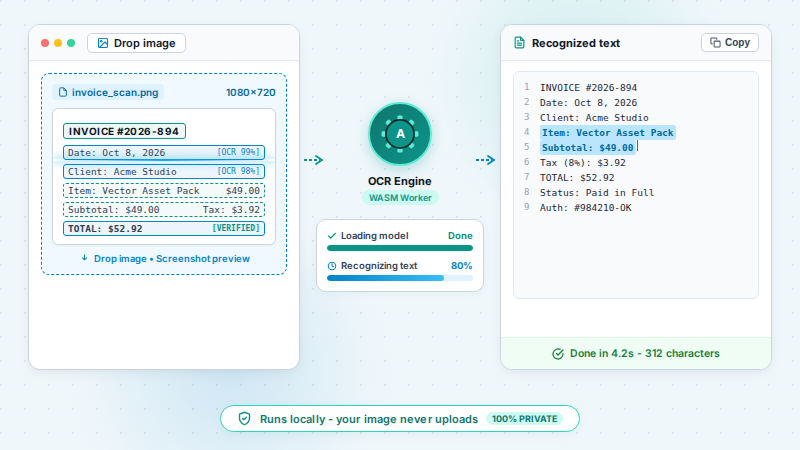
What is it? Image OCR Text Extractor extracts text from images using optical character recognition — 20 common languages, any combination (e.g. eng+chi_sim for mixed screenshots). It runs in your browser after a one-time engine and language-model download (each model is roughly 2–15 MB and downloads on demand the first time you use that language).
TL;DR: Extract text from images with OCR — 20 languages you can combine, running in your browser after a one-time model download.
How to use
- Open an image — PNG, JPG, WebP, BMP, GIF or PBM (TIFF and SVG are rejected; convert them first).
- Select one or more of the 20 languages — they run combined, so eng+chi_sim handles a mixed Chinese/English screenshot.
- Run OCR and copy or download the text, with a time and word-count summary.
- Need to stop? Cancel mid-run — the engine halts immediately and your last result is kept.
FAQ
Is my image uploaded?
No — the OCR model runs in your browser; the image never leaves your device. The engine and language data do download from a public CDN on first use.
Which languages are available?
20 common languages: English, Simplified/Traditional Chinese, Japanese, Korean, German, French, Spanish, Italian, Portuguese, Russian, Arabic, Hindi, Dutch, Polish, Turkish, Vietnamese, Thai, Ukrainian and Indonesian — select any combination.
Why is the first run slow?
Each language's model (~2–15 MB) downloads from the CDN the first time you use it — this can take seconds to tens of seconds depending on your connection. The browser caches it afterwards, so later runs skip the download.
Can it read Chinese and English in the same image?
Yes — select both languages and they run as one combined job (eng+chi_sim, or any other pair). Most online OCR tools take one language at a time; combining is the default here for mixed-language screenshots.
Which image formats can I OCR?
PNG, JPG, WebP, BMP, GIF and PBM. TIFF and SVG are rejected with a clear message — convert them to PNG or JPG first.
Can I cancel a slow run?
Yes — Cancel stops the engine immediately with a neutral 'cancelled' status (it is not an error), and your last successful result stays in place.
Is it really free and private?
Yes — a free daily allowance with no sign-in, and the image never leaves your device: tesseract.js runs in your browser. Only the engine and language models download from a public CDN on first use, then your browser caches them.
Examples
- Drop in a screenshot → get copyable text
Supported formats
Limitations
- The first run downloads the OCR engine; each language model (roughly 2–15 MB) downloads on demand the first time you use that language and is cached by the browser afterwards.
- The engine reads PNG, JPG, WebP, BMP, GIF and PBM only — TIFF and SVG are rejected; convert them to PNG or JPG first.
- Accuracy depends on image quality and text size.
Privacy
Privacy first: this tool runs entirely in your browser — your input and files never leave your device, and everything is cleared when you close the page.