Redact PDF Permanently
LocalRedact PDF by keyword — matched pages are rasterized, the text layer gone for good. Irreversible; runs locally, no upload, no sign-in, free daily use.
Drag files here, or click to browse
Supports PDF
Choose fileVector rewrite is experimental: trust the rewritten-pages count — pages that fail rewriting are flagged "not redacted". For critical files use rasterized burn-in.
Runs locally in your browser: pages containing the terms are rasterized with black boxes (irreversible); other pages keep vector quality. Nothing is uploaded.
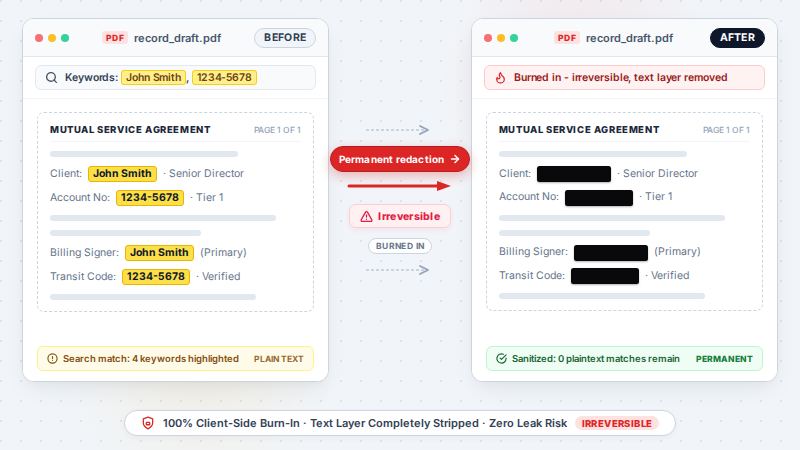
What is it? Redact PDF permanently blacks out sensitive text matched by keyword. Pages containing a keyword are rasterized so the text layer is gone and cannot be recovered; other pages keep full vector quality — all locally in your browser.
TL;DR: Permanently redact text by keyword — local, irreversible on redacted pages.
How to use
- Drop in a PDF (no sign-in needed).
- Enter the keywords to redact (comma separated) and pick raster or vector mode.
- Click Redact & Download — the redacted PDF saves automatically.
FAQ
Is redaction reversible?
No — pages containing a keyword are rasterized, so the text layer is removed and cannot be recovered.
Are my files uploaded?
No. Everything runs locally in your browser; nothing leaves your device.
Does it work on scanned PDFs?
No — keyword matching needs a selectable text layer. Run PDF OCR on scanned files first.
Which pages get redacted?
Only pages containing a matched keyword are rasterized; all other pages keep full vector quality and stay unchanged.
Is it free? Do I need an account?
Redacting a PDF is free with no sign-in — drop the file, enter keywords, download. It uses your daily free allowance; higher quotas are the paid Pro tier.
Can I redact a PDF without Adobe Acrobat or Pro?
Yes — this runs entirely in your browser, no install and no Adobe subscription needed. Acrobat Pro is the classic way to redact; this is the free, local alternative.
Why keyword redaction instead of drawing a black box over the text?
A drawn box or highlight only covers the text — the words are still in the file, can be lifted by selecting under the box, or removed by anyone with a basic editor. Redaction here rasterizes the whole page and removes the text layer, so there is nothing left to recover. That is also why you should double-check the redacted-pages summary: matching is per text run, and a term split across layout runs can be missed.
How do I confirm which pages were actually redacted?
The result lists every redacted page. Pages without a matched keyword are untouched and keep full vector quality — the vector mode also keeps bookmarks and metadata, while the raster mode drops them.
Examples
- Upload a PDF → keywords like John Smith,1234-5678 → download the redacted PDF
Supported formats
Limitations
- Pages containing a keyword are rasterized (text becomes non-selectable); other pages keep vector quality.
- Keyword matching works per text run — terms split across layout runs may be missed; check the redacted-pages summary.
- Rasterized output also drops document bookmarks and metadata (the vector mode keeps them).
Privacy
Privacy first: this tool runs entirely in your browser — your input and files never leave your device, and everything is cleared when you close the page.